CMS Create User Web Part
Create User - Simple Form
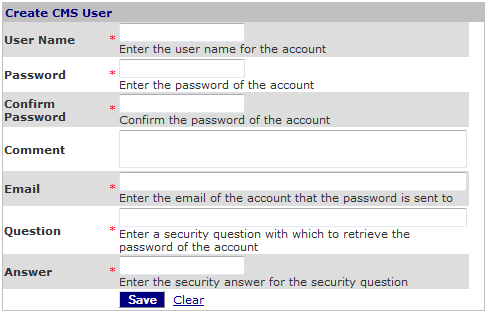
This Web Part is used to create a new CMS user that can log into CMS.
Follow the procedure to
Create a new CMS User.
Access
This Web Part is accessed by the
CMS Admin Panel or can be added to any page from the CMS Login Library.
Features
Features include:
- The form is used to create a CMS User or a custom CMS User.
- The form is available in the CMS Admin Panel.
- The form can be added to any page from the CMS Login Library.
- The password can be automatically generated for applications where users do not receive their password.
- Fields are marked required must be filled in before user is created.
Create User - Custom Form
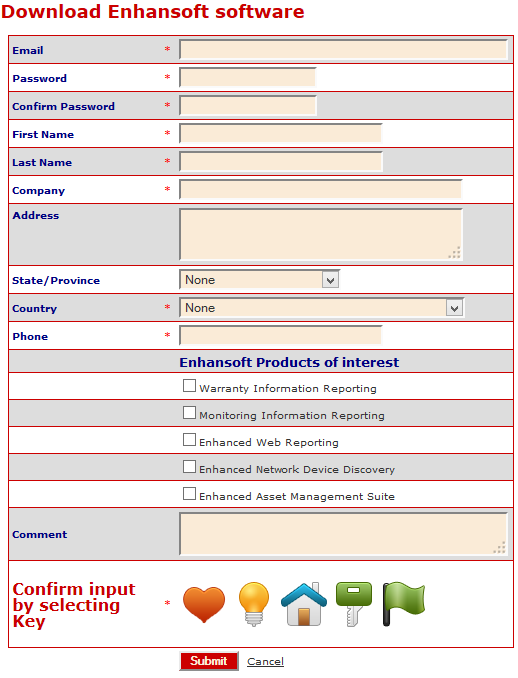
The features of interest in the custom form include:
- Title of the Web Part
- Email used as the Login Id
- Alternating css for each line of the form
- Required fields
- Header inserted into the form, i.e. 'Enhansoft Products of Interest'
- List of check boxes included in form gathering user preferences
- Image-based Captcha included
Edit Properties
Custom Edit properties include:
- Admin Role: A comma-delimited list of Roles that can use the Web Part.
- Prompt for Subscription?: Allows user to identify which subscription the new user is added to
- Prompt for Workspace?: Allows user to identify which workspace the new user is added to
- Requires Question and Answer?: if checked, then an email, security question and answer are required
- Save User Name as Email?: if checked, then the user name must be an email address
- Prompt for Time Zone?: if checked, then the user may select a time zone
- Prompt for User Class?: if checked, then the user may select which User Class is added for the New User
- User Login is Visible?: if un-checked, then the user object is hidden
- User Login Class: the custom class used to created the New User
- Save Method: a Jetfire method run after the New User is created
- Property Display: Select how properties are displayed in the form
- Workflow Config file: an XML file used to display properties when the Property Display = WorkflowConfig
- Auto-Login Type: identifies how the user is logged in
- Manual: user must login with user id and password
- Automatic: new user has cookie installed on their browser. Whenever, the user navigates to the website, they will automatically try to login
- AutoCookie: new user has cookie installed on their browser. User is sent an email with a key in it. Key MUST be used to unlock the Cookie. Once the cookie is unlocked, login behaves as an automatic login type. This is achieved when the user clicks the link in the email.
- Auto-generate Password?: If checked, then the password is auto-generated for the user.
- Captcha Type: A captcha prompt can be configured for the form.
- Create User Action: identifies what happens when a new user is created
- None: the form is cleared
- Another Account: the user may enter another new user
- Return to previous page: the user is returned to the previous page
- Login: the user is logged in
- Login and return to previous page: the user is logged in and returned to the previous page
- Login and route to destination: the user is logged in and routed to a destination page, as identified in the Destination Url property.
- Cancel Page Url: The Cancel page address is used to route the user to another page if the user clicks 'Cancel' on the create new user form.
- Destination Url: The page address routed to for Create User Action = Login and route to destination
- Send Email?: if checked, sends an email to the new user
- Confirm Url: The page that the user is directed to in the email to confirm the user and password
- bcc List: a comma-delimited list of email addresses that are included in the bcc list of the sent email
- Email Subject: the subject of the sent email
- Email Body: the body of the sent email
- Prompt for From Address: if checked, the user must enter an email address ad the 'from' address. This email is bcc'd to the from address.
- From User Credentials: User and Password credentials override the default credentials found the mail.config file of the website. Credentials are required to successfully send an email from the website domain.
- From Password Credentials
- Email Domain Blacklist: an XML file that identifies a list of email domains that are not accepted as email address domains for the email address in the form
- Email Link Text: text for the hyperlink is included in the email which routes the user back to the website. Used with Auto-Login Type = AutoCookie
- Prompt for List Input: if checked, configures additional fields for inclusion in the form
- Common COR Edit Features
Rules for creating a new user
- User Id must be unique
- Required fields must have input
- If custom user class includes property 'IPAddress', then the IP Address used to enter the data is captured in the New User data.
- The 'LastActivityDate' is updated to the last time that any user saved the user data.
- Field 'IsApproved' can be used to manage user login.
- Field 'IsLockedOut' can be used to manage user login.
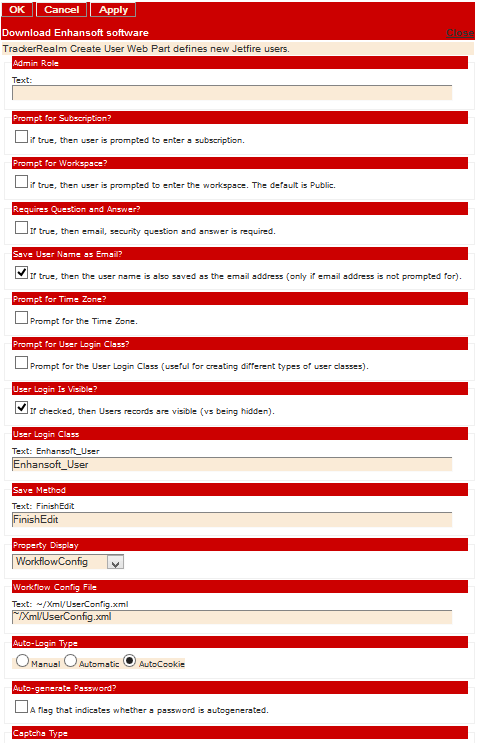 Editor for CMS Create User Form
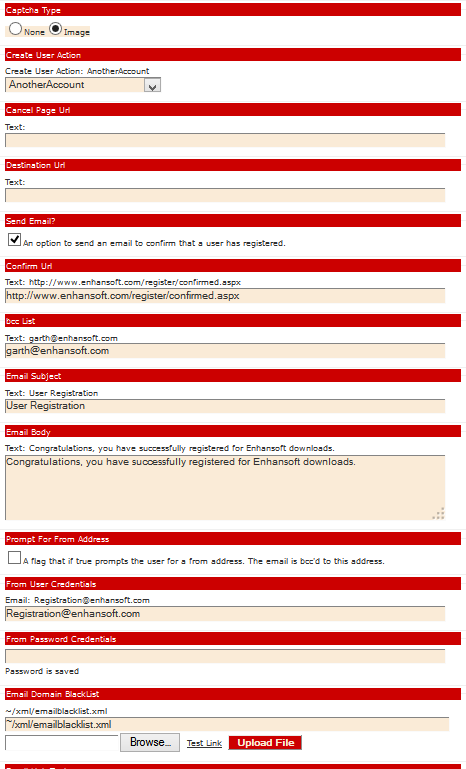 Editor for CMS Create User Form
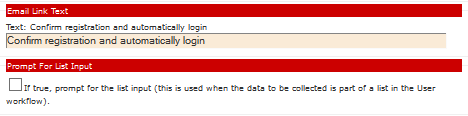 Editor for CMS Create User Form |
Workflow Configuration File
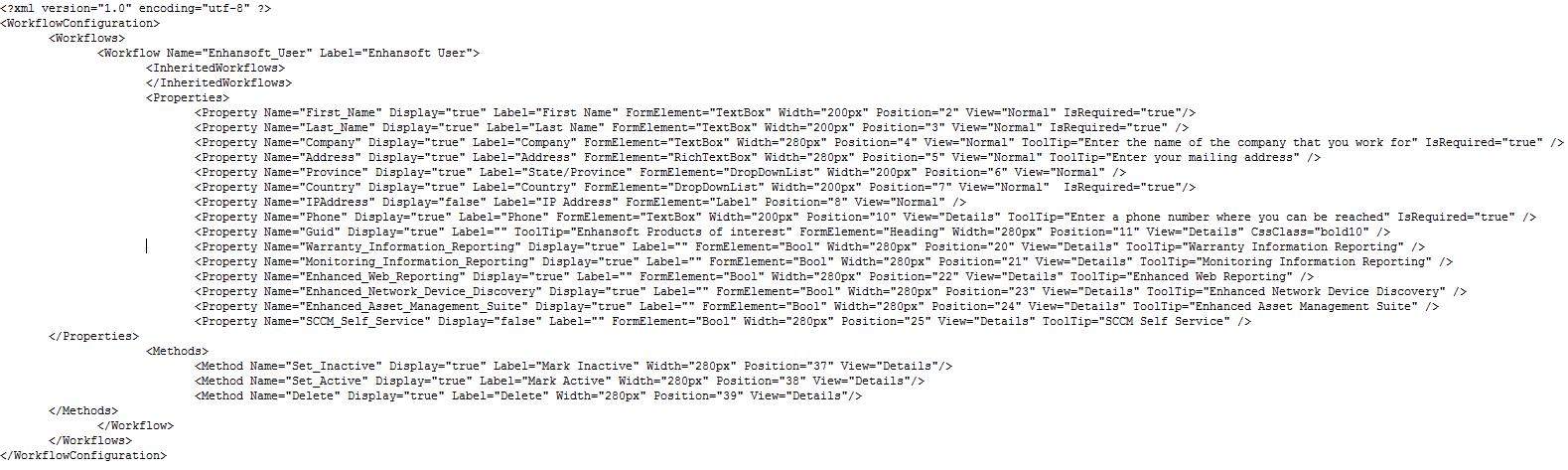
The XML file is used to configure the Create User form. The name in the configuration file is mapped to a property in the Jetfire workflow. The attributes define:
- Display: if 'true', the field is displayed
- Label: the label for the field
- FormElement: the way that the form prompts the user for input, e.g. TextBox, DropDownList, CheckBox, etc
- Width: the width of the field
- Position: the order of the field in the form
- IsRequired: if 'true', then field input is required to save the input of the form
- ToolTip: a description of the field used as a mouse-over
Note: Methods are included in the Workflow Configuration file and are typically used in 'Update' forms.