Page History: Web Part: CMS Access Rules
Compare Page Revisions
Page Revision: 2011/04/20 18:29
CMS Access Rules Web Part
This Web Part is used to refine how CMS Roles can access to pages within a folder by setting Edit, Catalog and Design.
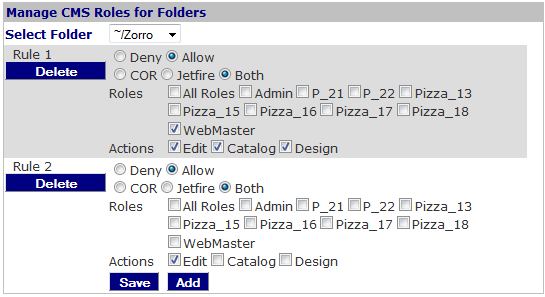
Procedure
- Select a folder where the CMS Roles are refined.
- Review the list of CMS Roles.
- If a Role is not required, it can be deleted.
Access
This Web Part is accessed by the
CMS Admin Panel.
Edit Properties
Properties that can be edited for this Web Part include:
- Admin Role: A comma-delimited list of Roles that are allowed to view and edit the Web Part.
- Folders: a comma-delimited list of folders that can be viewed with this Web Part. The default folder is the root folder, '~/'. If one folder is added, then the user can view and edit the CMS Roles that have access to pages in the folder.
- Common COR Edit Features.