Page History: CMS Admin Panel
Compare Page Revisions
Page Revision: 2010/12/15 16:30
CMS Admin Panel
The CMS Admin Panel is used to start populating the system with users, roles, pages, and files necessary to start building the website. The panel is available in three operational modes:
- Basic
- WebMaster
- Administrator
Basic
Basic is used by the
Mini-sites offering. It provides the administration interface to the small business owner for managing a fixed website.
WebMaster
If the logged in user has the WebMaster Role assigned, the user gets access to a subset of Web Parts in the CMS Admin Panel.
Admin
If the logged in user has the Admin Role assigned, the user gets access to all Web Parts in the CMS Admin Panel.
Getting Started
The CMS Admin Panel is the first Web Part seen when building a new Website. The website designer has uploaded the software, master templates, skins and the Admin page. The Admin page contains the CMS Admin Panel Web Part. Before the CMS Admin Panel can be used, it progresses through a series of stages:
- If there are no CMS Users added to the system, the CMS Admin Panel displays a Create CMS User form. The user fills in the form and a CMS User is created.
- If that there is at least one CMS User, the CMS Admin Panel prompts the user to login. The user sees the Login Prompt.
- The user MUST be logged in as a CMS User to use the CMS Admin Panel.
- If the user is logged into CMS, The CMS Admin Panel is displayed.
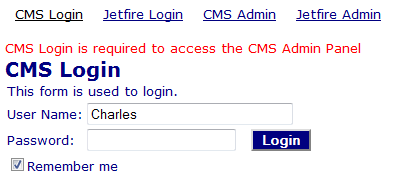
Figure: Login Prompt
Multiple Websites
The Microsoft Personalization database used by COR can store content for multiple websites at the same time. The 'Domain' displayed in various Web Parts identifies the website that content is being stored for.
A CMS Admin Panel supports one website that is defined by the Application Folder website configuration parameter.
Basic CMS Admin Panel
Websites that contain mini-sites make the Basic CMS Admin Panel available to site owners for making simple changes to the site.
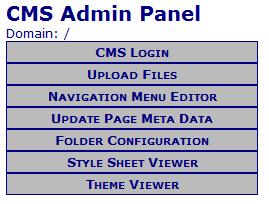
Figure: Basic mode of the CMS Admin Panel
Web Parts include:
- Login
- Upload Files is used by users to upload files to a folder in the website.
- Navigation Menu Editor is used by the CMS Administrator to edit the navigation file. (This uses the Navigation Link File.)
- Update Page Meta Data is used by the COR Administrator to update Title, Description and/or Keywords for a web page.
- Folder Configuration is used by the COR Administrator to edit properties for the website.
- Style Sheet Viewer is used by the CMS Administrator. It displays the styles defined in the style sheet. This makes it simple to identify what styles to use in a web page.
- Theme Viewer is used by the CMS Administrator. It displays the skins defined in the theme file. This makes it simple to identify what colours are used in a web page.
WebMaster Role view of CMS Admin Panel
The WebMaster CMS Admin Panel provides
- Page Management - the ability to create pages, upload and manage files.
- Site Management - the ability to manage the navigation menu and view style colours used on the site.
- Folder Management - the ability to manage access to pages in each folder of the site.
- User Management - the ability to create and manage users.
- Roles Management - this ability to create and manage roles.
- Feature Management - the ability to review data input by custom Web Parts.
- My Links - an optional list of favourite links.
for the website.
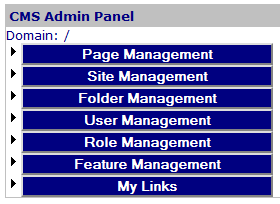
Figure: WebMaster mode of the CMS Admin Panel
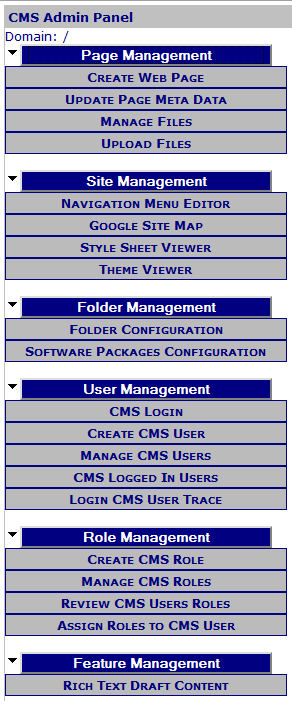
Figure: WebMaster mode of the CMS Admin Panel - Web Parts displayed
Admin Role view of CMS Admin Panel
The Administrator CMS Admin Panel provides
- Page Management
- Site Management
- System Administration
- Folder Management
- Web Part Management
- User Management
- Roles Management
- Feature Management
- My Links
for the website.
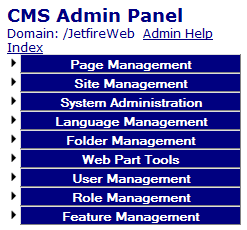
Figure: Administrator mode of the CMS Admin Panel
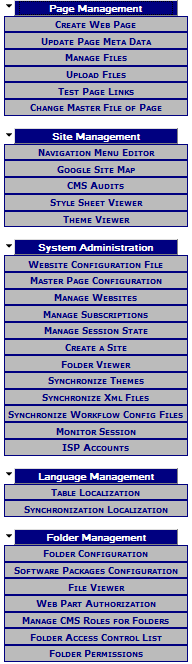
Figure: Administrator mode of the CMS Admin Panel - Web Parts displayed
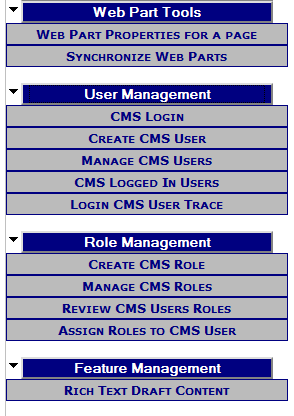
Figure: Administrator mode of the CMS Admin Panel - Web Parts displayed
Customizing the CMS Admin Panel
The CMS Admin Panel may be customized to suit your needs. Please review the
Customizing the Admin Panel page.
Administration Menus
Page Management
Page Management addresses the actions associated with a single page.
Web Parts for Page Management include:
- Create Web Page is used to add a new web page to the site.
- Update Page Meta Data is used by the COR Administrator to update Title, Description and/or Keywords for a web page.
- Manage Files is used to delete, rename, copy and upload files for the website.
- Upload Files is used by users to upload files to a folder in the website.
Site Management
Site Management addresses the actions associated with the website.
Web Parts for Site Management include:
- Navigation Menu Editor is used by the CMS Administrator to edit the navigation file. (This uses the Navigation Link File.)
- Google Site Map creates a site map file used by robots to scan your website.
- CMS Audits
- Style Sheet Viewer is used by the CMS Administrator. It displays the styles defined in the style sheet. This makes it simple to identify what styles to use in a web page.
- Theme Viewer is used by the CMS Administrator. It displays the skins defined in the theme file. This makes it simple to identify what colours are used in a web page.
System Administration
System Administration addresses the actions associated with the site and performed by the System Administrator.
Web Parts for System Administration include:
Folder Management
Folders Management addresses the actions associated with pages in a single folder.
Web Parts for Folder Management include:
Web Part Management
Web Part Management addresses the actions associated Web Parts.
Web Parts for Web Part Management include:
User Management
User Management addresses the actions associated with CMS users.
Web Parts for User Management include:
Roles Management
Roles Management addresses the actions associated with CMS roles.
Web Parts for Roles Management include:
Feature Management
Feature Management addresses the actions associated with a custom features included in the COR software.
Web Parts for Feature Management include:
Web Parts accessed from CMS Admin Panel
The following lists identify the complete set of Web Parts that can be viewed in the CMS Admin Panel.
Title: CMS Admin Panel
- Roles required to access: Admin
- Description: TrackerRealm CMS Admin Panel Web Part presents the administrative options for the site. The Correct Web Part is displayed for the selected action.
Title: CMS Audits
- Roles required to access: Admin
- Description: TrackerRealm Audits Web Part displays COR Audits.
Title: CMS Logged In Users
- Roles required to access: WebMaster,Admin
- Description: TrackerRealm Users Summary Web Part displays users that are currently logged in.
Title: CMS Login
- Description: TrackerRealm Login Web Part provides login for COR.
Title: Create CMS Role
- Roles required to access: WebMaster,Admin
- Description: TrackerRealm Create Role Web Part defines roles.
Title: Create CMS User
- Description: TrackerRealm Create User Web Part defines new users.
Title: Create Web Page
- Roles required to access: WebMaster,Admin
- Description: TrackerRealm Create Page Web Part allows the webmaster to create a new Web Page for the website.
Title: Folder Configuration
- Roles required to access: WebMaster,Admin
- Description: TrackerRealm Folder Configuration Part allows the user to update theme and access settings for a folder.
Title: Folder Permissions
- Roles required to access: Admin
- Description: TrackerRealm Folder Permissions Web Part allows the webmaster to set read/write privileges for folders.
Title: Google Site Map
- Roles required to access: WebMaster,Admin
- Description: TrackerRealm Google Site Map Part creates/updates the Google Site Map based on the Navigation Links File.
Title: ISP Accounts
- Roles required to access: Admin
- Description: TrackerRealm ISP Accounts Web Part displays the accounts used by the ISP to access the website.
Title: Login CMS User Trace
- Roles required to access: WebMaster,Admin
- Description: TrackerRealm Login Test Web Part provides a trace through the table to identify if the user can login.
Title: Manage CMS Roles
- Roles required to access: WebMaster,Admin
- Description: TrackerRealm Roles Web Part is used to edit roles.
Title: Manage CMS Roles for Folders
- Roles required to access: Admin
- Description: TrackerRealm CMS Access Web Part provides access to what COR capabilities that the user has based on a Folder in the website.
Title: Manage CMS Users
- Roles required to access: WebMaster,Admin
- Description: TrackerRealm Users Web Part provides user administration.
Title: Manage Files
- Roles required to access: WebMaster,Admin
- Description: TrackerRealm Manage Files Part allows the webmaster to manage files on the website.
Title: Manage Session State
- Roles required to access: Admin
- Description: TrackerRealm Manage Session State Web Part moves the management of session state from memory to database (this eliminates log-offs caused by network time-outs).
Title: Manage Subscriptions
- Roles required to access: Admin
- Description: TrackerRealm Subscriptions Web Part provisions valid subscriptions for the Application space. (used for Jetfire)
Title: Manage Websites
- Roles required to access: Admin
- Description: TrackerRealm Application Web Part provisions valid Applications for Websites.
Title: Master Page Configuration
- Roles required to access: Admin
- Description: TrackerRealm Master Page Configuration Part edits the Master Page of the site.
Title: Monitor Session
- Roles required to access: Admin
- Description: TrackerRealm Monitor Session Web Part monitors application and session objects.
Title: Navigation Menu Editor
- Roles required to access: WebMaster,Admin
- Description: TrackerRealm Navigation Menu Editor Web Part is used to edit the navigation file.
Title: Review CMS Users Roles
- Roles required to access: WebMaster,Admin
- Description: TrackerRealm User Roles Web Part defines Roles for a User.
Title: Rich Text Draft Content
- Roles required to access: Admin,WebMaster
- Description: TrackerRealm Draft Content Web Part is a list of CMS draft content for Rich Text Viewers. This is used for the publisher as a quick list of content to be published.
Title: Software Packages Configuration
- Roles required to access: WebMaster,Admin
- Description: TrackerRealm Software Packages Configuration Part is used to configure software packages for folders.
Title: Style Sheet Viewer
- Description: TrackerRealm Style Sheet Viewer Web Part shows the (simple) styles of the StyleSheet contents.
Title: Synchronize Web Parts
- Roles required to access: Admin
- Description: TrackerRealm Synchronize Web Part synchronizes a selected web part to 'identical' web parts found on other pages.
Title: Theme Viewer
- Description: TrackerRealm Theme Viewer Part displays the skin file for the current Theme.
Title: Update Page Meta Data
- Roles required to access: WebMaster,Admin
- Description: TrackerRealm Page Meta Data Part allows the webmaster to edit the meta data associated with a page.
Title: Upload Files
- Description: TrackerRealm Upload Files Part allows public users to upload files to a folder on the website (Useful for uploading videos and photos).
Title: Web Part Properties for a page
- Roles required to access: Admin
- Description: TrackerRealm Web Part Properties Part displays browsable properties of all Web Parts contained on a Web Page (this includes static Web Parts).
Title: Website Configuration File
- Roles required to access: Admin
- Description: TrackerRealm WebConfig Test Web Part verifies that the Web.Config file is configured correctly for CMS and Jetfire.