Page History: Web Part: CMS Create User
Compare Page Revisions
Page Revision: 2011/04/21 14:44
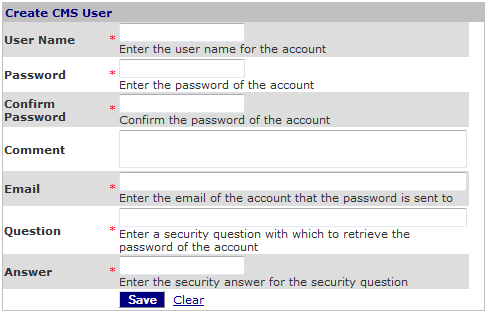
CMS Create User Web Part
This Web Part is used to create a new CMS user that can log into CMS.
Follow the procedure to
Create a new CMS User.
Access
This Web Part is accessed by the
CMS Admin Panel or can be added to any page from the CMS Login Library.
Features
Features include:
- The form is used to create a CMS User.
- The form is available in the CMS Admin Panel.
- The form can be added to any page from the CMS Login Library.
- The password can be automatically generated for applications where users do not receive their password.
- Fields are marked required must be filled in before user is created.
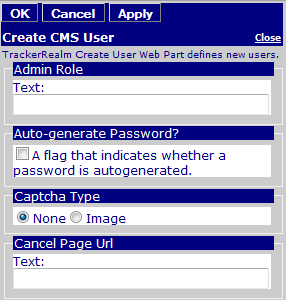
Editor for CMS Create User Form
Edit Properties
Custom Edit properties include:
- Admin Role: A comma-delimited list of Roles that can use the Web Part.
- Auto-generate Password?: If checked, then the password is auto-generated for the user.
- Captcha Type: A captcha prompt can be configured for the form.
- Cancel Page Url: The Cancel page address is used to route the user to another page if the user clicks 'Cancel' on the create new user form.
- Common COR Edit Features