Page History: Web Part: CMS Image
Compare Page Revisions
Page Revision: 2009/07/13 18:11
Assembly: TrackerRealm.WebPartsE
License: GNU GPL/Commercial
Image Part Features
- One image is displayed
- A navigation URL may be assigned to the Image
- Alternate text may be set for the image
- Background Colour may be set. This fills in the space that the image does not use.
- Image Width and/or Height may be set per Image
Screen Shots
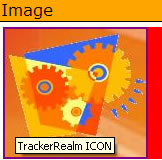
Figure 1 shows an example of a Image Web Part. Note the following:
- One image is shown
- The alternate text, ‘TrackerRealm ICON’, is superimposed on the image
- The background colour is red
Editor for the Image
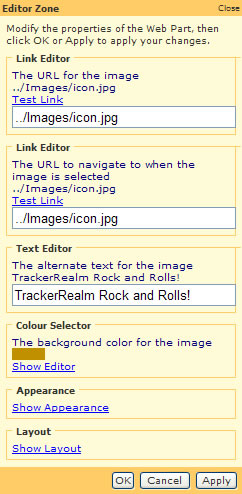
Figure 2 shows the editor for the Image. This is shown to the user, when the Image Part is edited.
Custom Edit properties
Custom Edit properties for the Image Part include:
- Link to the image file
- Enter the link to the image file
- Test the link to verify that the file can be found by the Web Part
- Navigation Link
- Enter the link to the image file
- Test the link to verify that the file can be found by the Web Part
- Alternate text for the image
- Enter the text in the text box
- Background Color for the Image
- Select a color from the colour selector
Standard Edit properties
Refer to
COR%20Images%2fStandard Editors for more information.
Image Layout
The image includes a layout property that is used to position and resize the image. The options include:
- None: The content preserves its original size.
- Fill: The content is resized to fill the destination dimensions. The aspect ratio is not preserved.
- Size to Height: The content is resized to fill the destination height dimension while it preserves its native aspect ratio.
- Size to Width: The content is resized to fill the destination width dimension while it preserves its native aspect ratio.
- Center: The image is horizontally centered in the space.
Note: the Appearance properties for Height and Width may also be used to provide space for the image.
Compare to Microsoft Image
Microsoft offers an Image Web Part as part of SharePoint Services 2007. This section compares the Microsoft Image to the TrackerRealm Image Part.
Attribute              Microsoft Image     TrackerRealm Image
SharePoint 2007	              Yes	             Yes
ASP.net 2.0                                       Yes
Image Link                      Yes	             Yes
Alternative Text                Yes	             Yes
Navigation Link	              Yes
Image Vertical Alignment        Yes	             Yes
Image Horizontal Alignment                        Yes
Background Color                                  Yes
Stretch Image to fill                             Yes
Size Image to Height		             Yes
Size Image to Width		             Yes
Connections (Get file from Web Part on same page)
                                Yes