Page History: Web Part: CMS Word Viewer
Compare Page Revisions
Page Revision: 2009/07/13 18:18
Assembly: TrackerRealm.WebPartsE
License: GNU GPL/Commercial
Word Viewer Features
- Edit in Word
- Display content saved in Word directly on a web page
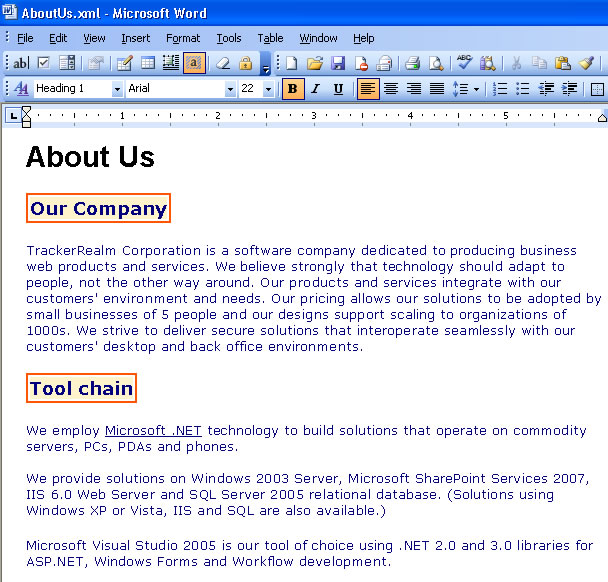
Edit using Microsoft Word
Figure 1 shows a file being edited with Microsoft Word.
Word Viewer in html
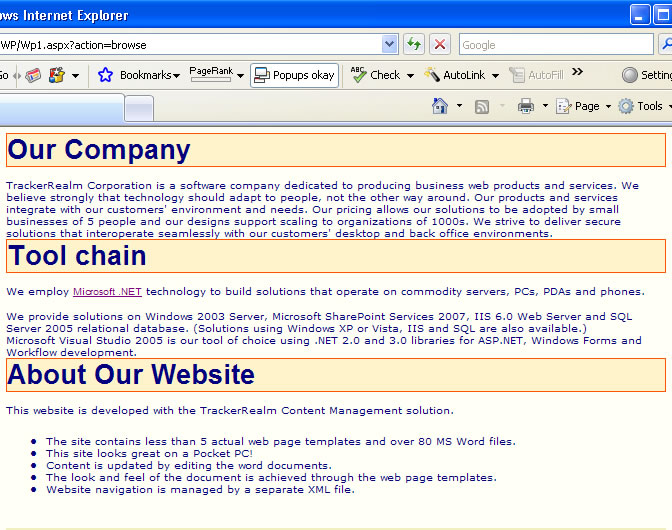
This section shows examples of how the Word Viewer displayed in a browser. Figure 2 is an example of a Word Viewer, which displays the content of a Word XML file directly in a web page.
Customizing the Word Viewer Part
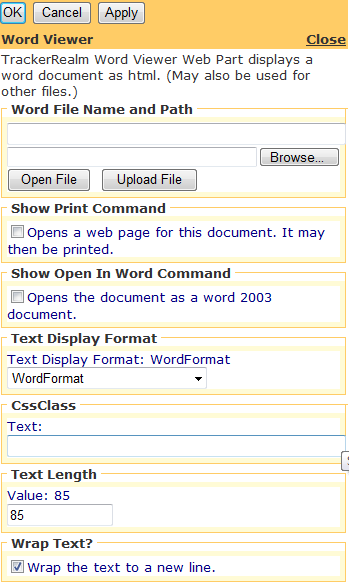
Figure 3 shows the editor for the Word Viewer Web Part.
This is shown to the user, when the Word Viewer Part is edited.
Custom Edit properties for the Word Viewer include:
- Link to the XML content file
- Enter the link to the XML file with the content
- Test the link to verify that the file can be found by the Web Part
- Type of text being displayed (Word, Text)
- If plain text is displayed in the control, e.g. display Jetfire code
- Css Class used for plain text
- Word Wrap
- Text Length - number of characters displayed in a line
- Common COR Edit Features