Page History: Web Parts: CMS Standard Editors
Compare Page Revisions
Page Revision: 2009/07/13 18:08
Assembly: TrackerRealm.WebBase
License: BSD
Standard Editors are used in most, if not all Web Parts. This page includes the standard editors.
Appearance Editor
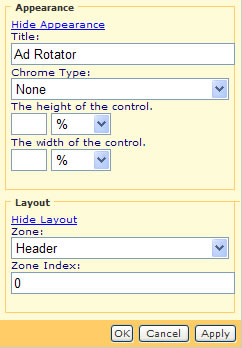
Figure 1 shows the properties that can be edited with the Appearance Editor and the Layout Editor.
Appearance Editor Properties include:
- The title of the Web Part on the Page
- The type of ‘chrome’ – title and border for the Web Part
- The Height of the Web Part
- The Width of the Web Part
Layout Editor
Layout Editor Properties include:
- The Zone that the Web Part is in
- The order of the Web Part in the zone
Style Editor
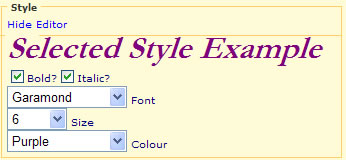
Figure 2 shows the Style Editor. Styles are used extensively in web page design. The Style Editor shows a list of style options used in web page design. The style options include:
- Bold
- Italic
- Font-Family: Arial, Courier-New, Garamond, Georgia, Tahoma, Times, Verdana
- Font-Size: 1 (small) to 6 (large)
- Text Colour: a drop down list with 21 colours
Color Editor
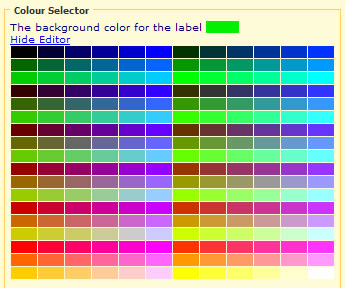
Figure 3 shows the Color Editor. The Colour Editor is used to color various parts of the Web Part.