Page History: Web Part: CMS Dynamic Menu
Compare Page Revisions
Page Revision: 2010/06/06 21:30
COR Dynamic Menu Web Part
The COR Dynamic Menu Web Part is used to add navigation to the website. This section shows examples of how the Dynamic Menu is displayed in a browser. Figure 1 is an example of a Dynamic Menu.

Dynamic Menu Features
- View a list of links in web page
- View links as a menu control that may be styled as: buttons
- Select orientation of the links
- Add styles to links
- Edit Xml file with Links
- Uses the Navigation File to display the menu
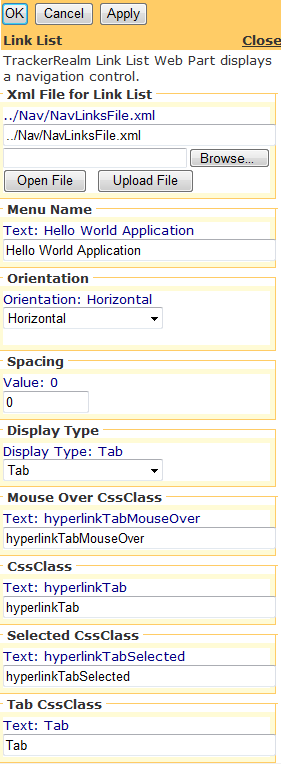
Figure 2: Dynamic Menu Editor
Edit using Dynamic Menu Editor
Figure 2 shows link list attributes being edited.
Customizing the Dynamic Menu Part
Custom Edit properties for the Link Lists include:
- Navigation file for Links
- Menu Name
- Menu Depth: number of levels of menu to display
- Orientation of links: Vertical, Horizontal
- SkinID: used to customize the style of the menu
- Spacing between links
- Common COR Edit Features