Page History: Web Part: CMS Dynamic Menu
Compare Page Revisions
Page Revision: 2010/06/06 21:36
====COR Dynamic Menu Web Part====
The COR Dynamic Menu Web Part is used to add navigation to the website. This section shows examples of how the Dynamic Menu is displayed in a browser. Figure 1 is an example of a Dynamic Menu.
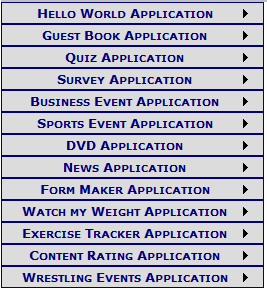
Dynamic Menu Features
- View a list of links in web page
- View links as a menu control that may be styled as: buttons
- Select orientation of the links
- Add styles to links
- Edit Xml file with Links
- Uses the Navigation File to display the menu
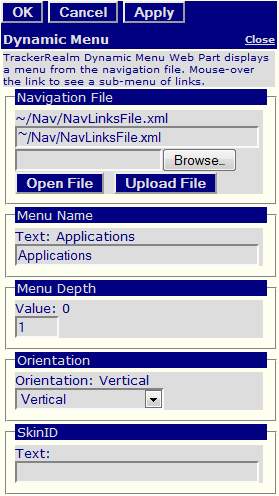
Figure 2: Dynamic Menu Editor
Edit using Dynamic Menu Editor
Figure 2 shows link list attributes being edited.
Customizing the Dynamic Menu Part
Custom Edit properties for the Link Lists include:
- Navigation file for Links
- Menu Name
- Menu Depth: number of levels of menu to display
- Orientation of links: Vertical, Horizontal
- SkinID: used to customize the style of the menu
- Spacing between links
- Common COR Edit Features
