Page History: Workflow Configuration File for Web Design
Compare Page Revisions
Page Revision: 2009/07/28 22:34
Jetfire Workflow Configuration File
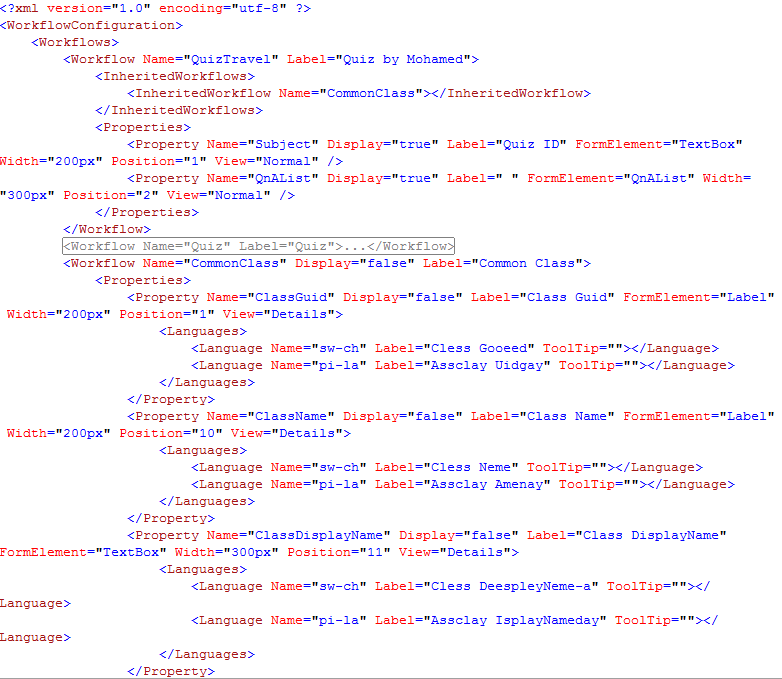
A snippet of the Jetfire Workflow Configuration File is the figure shown below. This file is defined by the
Website Designer in conjunction with the
Workflow Designer.
The Jetfire Workflow Configuration File is read by the Jetfire Web Parts to produce a custom appearance on the GUI. Display characteristics include:
- Labels that define the user interface
- Multiple Languages
- The types of controls used to display information or solicit input
- The order in which information is displayed
- The style and width of the information displayed
The Xml File
The xml file is a complete description of how the Workflow should be displayed on the GUI. This includes:
- Properties
- Methods (or commands)
- States
- Headings
- InheritedWorkflows
- Filters
Properties
Display characteristics for Properties include:
- Name - the name of the property.
- Label - the label displayed to the user for the property.
- Languages - Multiple languages are supported for labels.
- Display - a flag (true or false) used to turn-off the display of the property, yet capture the information for future use.
- FormElement - the type of control used to display the value of the property on the web page.
- Width - the width of the information. e.g. the width of the textbox used for input.
- CssClass - the css class from the website style sheet that is used to style the information.
- Position - the order in which properties are displayed.
- NewLine - a flag (true or false) used (in some Jetfire Web Parts) to identify that a new line is required.
- CellPrefix - the prefix used (in some Jetfire Web Parts) for table-based displays of properties.
- CellNumber - the cell number used (in some Jetfire Web Parts) for table-based displays of properties.
- View - this type of display: Normal, Details, Cell.
Methods
Display characteristics for Methods include:
- Name - the name of the method.
- Label - the label displayed to the user for the method.
- Languages - Multiple languages are supported for labels.
- Display - a flag (true or false) used to turn-off the display of the method, yet capture the information for future use.
- Width - the width of the information. e.g. the width of the command.
- Position - the order in which methods are displayed.
- View - this type of display: Normal, Details, Cell.
States
Display characteristics for States include:
- Name - the name of the method.
- Label - the label displayed to the user for the method.
- Languages - Multiple languages are supported for labels.
- Display - a flag (true or false) used to turn-off the display of the method, yet capture the information for future use.
- Width - the width of the information. e.g. the width of the command.
- Position - the order in which methods are displayed.
- View - this type of display: Normal, Details, Cell.
Headings
Headings are used in table-based displayes. Display characteristics for Headings include:
- Label - the label displayed to the user for the method.
- Languages - Multiple languages are supported for labels.
- Width - the width of the information. e.g. the width of the command.
- Position - the order in which methods are displayed.
Inherited Workflows
Website Designers take great care to create pages with consistent labels. The Inherited Workflow is reference to a common definition of display characteristics that may be used by multiple workflows in the Workflow Confguration File. e.g. the
Subject property is included in every workflow. Most workflows use this property to denote the
name of the workflow being described. The display characteristics of the
Subject property can be reinforced in the GUI by using an inheritied workflow that defines those characteristics.
The Inherited Workflow is also used to define reports.
Filters
Filters are used to reduce the number of workflows displayed. Filters in the Workflow Configuration File perform the same task for Reports.
Filter characteristics include:
- (Filter) Operation - when multiple filters are used, this defines how the filters are grouped, e.g. AND, OR.
- Filter - the definition of one or more filters used.
- Expression - the definition of the expression used in the filter.
- Name - the propery name (dot expressions are supported).
- Value - the value of the property.
- (Expression) Operation - the operation of the property name and value, e.g. Name="Gender" Value="Female" Operation="Equals" means Gender = "Female".
- ClassType - the type of data stored in the property. e.g. string, boolean, int, uint, Date, DateTime, TimeSpan.
Jetfire Web Part Applications
Types of Jetfire Web Parts that make use of the Jetfire Workflow Configuration file include:
- Workflow Editors
- Table-based displays for properties
- Workflow Reports
Roles and the Workflow Configuration File
Roles are used to create different views of properties and methods.
The inclusion of properties, methods and states in the Workflow Configuration file does not mean that the user will see the information. Rather, the Workflow Configuration file contains display characteristics for how the information is displayed if the user has access to the information.
Workflow Editors
A number of Workflow Editor Web Parts display properties. The Workflow Configuration File is used to create a data-driven highly-customized GUI. Workflow Editors display properties, methods and states.
Table-based displays for properties
A number of Table-based Display Web Parts display properties. The Workflow Configuration File is used to create a data-driven highly-customized GUI. Table-based displays display properties and headings.
Workflow Reports
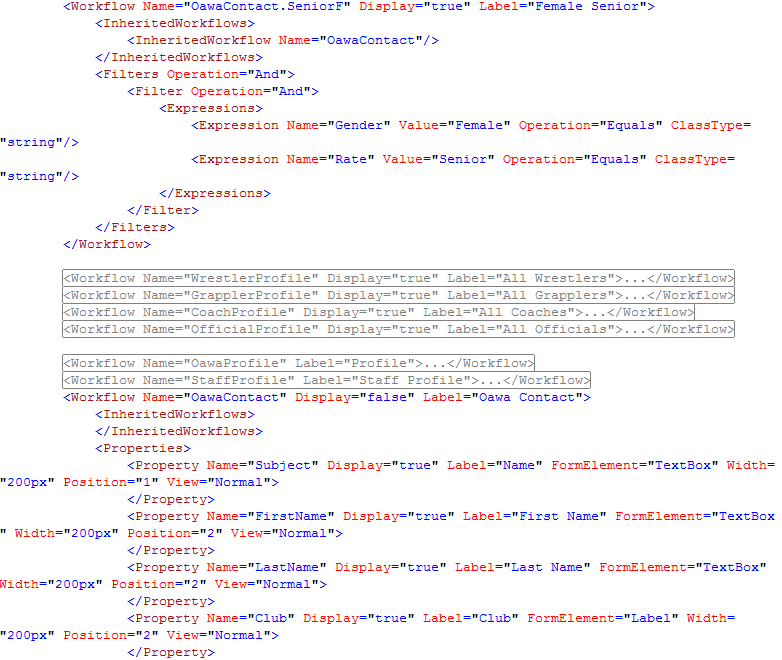
The Reports application uses the Workflow Configuration file to define user reports. The figure shown below shows how reports are defined.
Reports are typically defined by two entries in the Workflow Configuration File:
- The Report Workflow
- The Displayed Workflow
The Report Workflow defines the name of the Report and the Filter characteristics. In the example file shown below, the report workflow is Name="OawaContact.SeniorF". The label displayed in the Reports Web Part is "Senior Female". The filters are defined to look for Oawa Contact that have Gender = "Female" and Rate = "Senior". The Inherited Workflows contains a reference to OawaContact, which is the Displayed Workflow.
The Displayed Workflow contains the display characteristics for the Report Workflow. By separating the display characteristics from the report characteristics, the Display Workflow may be inherited by multiple Report Workflows, thus creating a consistent look and feel for the GUI.