Page History: Jazz Filtering
Compare Page Revisions
Page Revision: 2017/05/08 23:55
Jazz Filtering Overview
Jazz Filtering is used in a number of Web Parts to display a subset of records of a particular class. e.g. show the 'completed projects', 'not started tasks', 'tasks that due today'.
Most filters are simple, e.g. 'IsCompleted=true' for Projects displays only the completed projects.
Some filters are complex, such as the filter shown in Figure 1. The filter show in this figure is a three-part filter.
- Filter by Site: filters the records by the site where they are located. This is useful when you are collecting records from multiple stores and want to compare records between stores. A drop down list is displayed on the page for the user to select the site (or all sites) that they want displayed.
- Duration.Hours>2;StartTime.Year=2014;IsCompleted=true;: is a name-value set of filters. This filter is useful when the objects being filtered have the properties Duration, StartTime and IsCompleted. You need to have some knowledge of the object to create filters. Adding dot expressions to the filter makes the filter useful and usually simpler.
- TimeSpan.Hours>2 means the value of the Duration property in terms of Hours is greater than 2.
- StartTime.Year=2014 means the value of the StartTime property in terms of the Year is equal to 2014.
- IsCompleted=true means that value of the IsCompleted property is true.
- When these three conditions are true, then the record is displayed in the browser.
- Foreign Key Filter = LocationId;Station;Location means that a drop down list for the LocationId property will be displayed with a label - Station and containing all Location records.
|
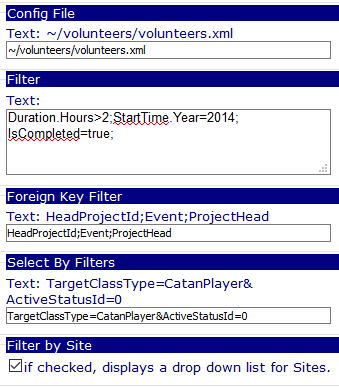 Figure 1: Editor Parameters for Jazz Filtering |
More about Jazz Filtering
Jazz Filters are used for a variety of tasks in the Web Parts. They are used by website administrators to:
- Create custom collections of Jazz Models used in navigation, grids, tables
- Create custom collections of Jazz Models used in Reports
Jazz Filters may be configuration using the Web Part Editor as shown in Figure 1 or in
xml files as shown in Figure 2.
Let's explore the contents of the figure.
- There are two Workflows defined: 'Worker.Report' and 'Worker'.
- The 'Worker.Report' workflow contains a definition for the filters that are used to filter all Worker models found in the database.
- The 'Worker' workflow contains a definition of properties and methods that are displayed on the user interface.
- 'Worker.Report' inherits the contents of the 'Worker' workflow. This means that even though there are no properties or methods contained in the 'Worker.Report' workflow that would be used to display the model, properties and methods of the 'Worker' workflow will be used for the display.
Filters XML structure
The Filters XML structure, shown in Figure 2, shows three levels: Filters, Filter and Expression.
Filters
- Filters can be viewed as a wrapper or container for the Filter.
- Filters is a Filter collection.
- Filters have a logic operation: AND, OR, NAND, NOR.
- AND means that ALL filters must match for a result to be displayed.
- OR means that ANY filter must match for a result to be displayed.
- NAND means that NOT ALL Filter(s) must match for a result to be displayed.
- NOR means that NOT ANY Filter must match for a result to be displayed.
Filter
- Each Filter can have one or more conditions (or expressions).
- IN Figure 1, Duration.Hours>2;StartTime.Year=2014;IsCompleted=true; is the Filter.
- Filter has a logic operation: AND, OR, NAND, NOR.
- The logic definitions are the same definitions shown in Filters, except that the Expressions must match.
Expression
- Expression is the workhorse of the filters structure.
- Each expression contains the Name of a property in the model, a Value of the Model property and a compare operation.
- The expression is a match for a model, when the Value of the Named property matches the condition of the compare operation.
- e.g. Expression matches Duration.Hours>2; when the value of Hours for the model.Duration property must be greater than 2 for a match.
- e.g. Expression matches ;StartTime.Year=2014;; when the value of Year for the model.StartTime property must be equal to 2014 for a match.
- e.g. Expression matches ;IsCompleted=true; when the value of the model.IsCompleted property must be must be true for a match.
- Note: If an AND Filter contains these three Expressions, then all three expressions must match for the filter to match.
- Note: If an OR Filter contains these three Expressions, then any one of the three expressions must match for the filter to match.
Name-Value Filter Syntax
Name-Value filters have the following syntax: Property-Operation-Value.
- n1=v1: means that the value of the property n1 must be equal to v1.
- n1!v1: means that the value of the property n1 must not be equal to v1.
- n1!=v1: means that the value of the property n1 must not be equal to v1. This is an alternate notation to the previous Not Equals filter.
- n1<v1: means that the value of the property n1 must be less than v1.
- n1<=v1: means that the value of the property n1 must be less than or equal to v1.
- n1>v1: means that the value of the property n1 must be greater than v1.
- n1>=v1: means that the value of the property n1 must be greater than or equal to v1.
- n1> IsNull: means that the value of the property n1 must be be null for a match.
- n1> NotIsNull: means that the value of the property n1 must NOT be be null for a match.
- n1> IsEmpty: means that the value of the property n1 must be be a blank string for a match.
- n1> NotIsEmpty: means that the value of the property n1 must NOT be be a blank string for a match.
- n1=v1;n2=v2: the ; indicates that this is an AND filter, means that all conditions must be true.
- n1=v1&n2=v2: the & indicates that this is an AND filter, means that all conditions must be true. This is an alternate notation for the previous AND filter.
- n1=v1|n2=v2: the | indicates that this is an OR filter, means that at least one condition must be true.
- n1=v1!&n2=v2: the !& indicates that this is an NAND filter, means that none of the conditions must be true.
Filter Syntax Notes
- The trailing ; in the filter is optional.
- ; and & mean the same thing - AND.
- Less Than, Less Than or Equals, Greater Than, and Great Than or Equals filters only apply to specific Property types: DateTime, TimeSpan, integers (32 bit numbers), long (64 bit numbers), doubles (fractions).
- The Config file contains a list of Properties.
- The Admin panel contains tools for understanding properties.
Configuration File
The configuration file is used to style the display of a Jazz object. More information is available at
Workflow Configuration File for Web Design.
All Jazz classes have a default Configuration File embedded in the software. This property points to an external file that overrides the internal definitions.
Edit Properties
Edit properties for Jazz Filtering include:
- Config File: an xml-based file that contain workflow configuration parameters used to customize the display of a Jazz object.
- Filter by Site: Sites define a specific location. Network Applications that exist at multiple stores, e.g. stores, find it useful to filter objects for a specific store.
- Filter: A 'name=value;' delimited list of properties and values used to filter the collection displayed. The model MUST satisfy ALL conditions to be displayed.
- Foreign Key Filter: A 'propertyName;DisplayName;group;' property and group used to filter the collection displayed. e.g. ProjectId;Hobbits;Project, where ProjectId is a foreign key property, Hobbits is the name displayed on the form and Project is the class name of the group displayed in the drop down list.
|
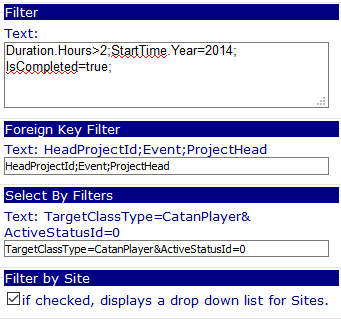 Figure 2: Editor Parameters for Jazz Filtering |
If Filter by Site and/or Foreign Key Filter are configured for the Web Part, then they are displayed as shown in Figure 3.

Figure 3: Web Part Filters