Page History: Personalization Control
Compare Page Revisions
Page Revision: 2009/07/31 14:36
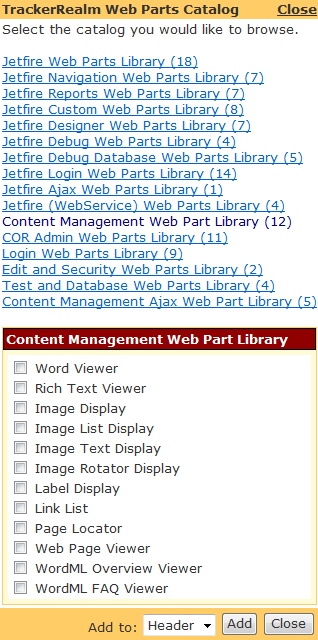
Figure 1: TrackerRealm Web Parts Catalog
Personalization Control
The Personalization Control displays:
- TrackerRealm Web Part Catalog displays the catalog of COR and/or Jetfire Web Parts
- Editor for Custom Properties in Web Part being edited
- Appearance Editor
- Layout Editor
The Personalization Control is visible when:
- A COR Administrator is logged in and the Web Page is in Library Mode
- The TrackerRealm Web Parts Catalog displays a list of COR and Jetfire Libraries and the list of Web Parts in the selected library.
- The Web Parts of each Library is displayed by selecting the Library.
- A COR Administrator is logged in and a Web Part is in Edit Mode
- The Edit Properties are shown for the Web Part in Edit Mode. Each Web Part in the wiki shows the Edit Properties for the Web Part in Edit Mode.
The Personalization Control is added to the
Master Page by the
Website Designer.
Web Control Markup
<%@ Control Language="C#" AutoEventWireup="true" CodeFile="WebPartLibraryControl.ascx.cs" Inherits="TrackerRealm.Website.WebPartLibraryControl" %>

<%@ Register TagPrefix="jfwp" Namespace="TrackerRealm.Jetfire.WebParts" Assembly="TrackerRealm.Jetfire.WebParts" %>
<%@ Register TagPrefix="cc1" Namespace="TrackerRealm.WebPartsE" Assembly="TrackerRealm.WebPartsE" %>
<%@ Register TagPrefix="base1" Namespace="TrackerRealm.WebBase" Assembly="TrackerRealm.WebBase" %>

<asp:Table ID="CatalogTable" runat="server"><asp:TableRow><asp:TableCell>
    <!-- THIS DISPLAYS THE WEB PART LIBRARIES -->
    <jfwp:JetfireCatalogZone ID="CatalogZone1" runat="server" >
      <ZoneTemplate>
        <asp:DeclarativeCatalogPart ID="CatalogPart1" runat="server" Title="TrackerRealm Web Part library" >
            <WebPartsTemplate>
            </WebPartsTemplate>
        </asp:DeclarativeCatalogPart>
        <asp:PageCatalogPart ID="PageCatalogPart1" runat="server" />
      </ZoneTemplate>
    </wp:WebPartCatalogZone>
    <cc1:TrOkCancelEditorButtons ID="TrOkCancelEditorButtons1" runat="server" />
    <cc1:TrEditorZone ID="EditorZone1" runat="server" >
      <ZoneTemplate>
       <asp:PropertyGridEditorPart ID="PropertyGridEditorPart1" runat="server" Title="Edit Custom Properties" />
       <base1:TrAppearanceEditorPart ID="TrAppearanceEditorPart1" runat="server"/>
       <base1:TrLayoutEditorPart ID="TrLayoutEditorPart1" runat="server"/>
      </ZoneTemplate>
    </cc1:TrEditorZone>
</asp:TableCell></asp:TableRow></asp:Table>
Figure 1 displays the TrackerRealm Web Parts Catalog that contains COR and Jetfire Web Part Libraries. The ASP.NET markup code displayed above is used to display this catalog.
<jfwp:JetfireCatalogZone ID="CatalogZone1" runat="server" >
COR Web Part Libaries are displayed by replacing 'jfwp:JetfireCatalogZone' in the code displayed above with:
<cc1:TrCatalogZone ID="CatalogZone1" runat="server" >
All TrackerRealm Web Part Libraries are displayed by replacing 'jfwp:JetfireCatalogZone' in the code displayed above with:
<wp:WebPartCatalogZone ID="CatalogZone1" runat="server" >