Page History: Web Part: Manage Rewrite Rules
Compare Page Revisions
Page Revision: 2013/01/22 18:46
Manage Rewrite Rules Web Part
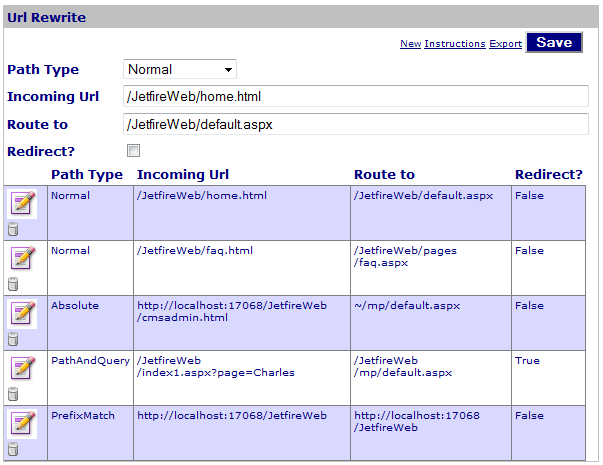
This page shows the Web Part for managing the rules associated with Rewrite Rules.
The Web Part shown in the figure above, shows the following components:
- A list of actions that the user can access (Refer to procedures below for more information).
- The Edit form. This is shown when the user edits a row in the table or clicks 'New'.
- A table of Rewrite Rules found in the xml file.
Access
This Web Part is accessed by the
CMS Admin Panel.
Prerequisites
The Rewrite.xml file is found from the web.config parameter for the 'Path to Url Rewrite file'. Refer to the
CMS Website Configuration File to edit this field.
The web.config file MUST also have a http handler or http module for url rewriting associated with it.
To export a copy of the Rewrite Rules, click the Export link at the top of the form.
Procedures
Procedures include:
Edit a Rewrite Rule
To edit a Rewrite Rule, click the 'Edit' link beside the rule.
When finished, click the save button. This saves the changes to the Rewrite.xml file.
Create a Rewrite Rule
To create a Rewrite Rule, click the 'New' link at the top of the form.
When finished, click the save button. This saves the changes to the Rewrite.xml file.
Delete a Rewrite Rule
To delete a Rewrite Rule, click the 'Delete' link beside the rule.
The change is immediately saved to the Navigation file.
Impact to the web.config file
The URL rewrite component uses either an http module or an http handler. Rewrite checking is triggered when a URL hits either one.
URL Rewrite using http handler
If the URL Rewrite component is configured for use in the http handler, then the file type that is checked can be selected. This is the normal technique used for URL Rewrite.
The following code shows the code that is entered in the web.config file for the website.
    <httpHandlers>
      <add verb="*" path="*.aspx" type="TrackerRealm.WebBase.UrlRewriteFactory, TrackerRealm.WebBase"/>
    </httpHandlers>
URL Rewrite using http module
If the URL Rewrite component is configured for use in the http module, then every file sent to the browser is checked. Therefore, this technique should be used carefully.
The following code shows the code that is entered in the web.config file for the website.
    <httpModules>
      <add name="ModuleRewriter" type="TrackerRealm.WebBase.UrlRewriteModule, TrackerRealm.WebBase"/>
    </httpModules>
Edit Properties
Custom Edit properties include:
- Admin Role: a comma-delimited list of Roles allowed to use the Web Part
- Url Rewrite Path: the path to the xml file for Rewrite Rules.
- Common COR Edit Features