Web Part: CMS Assign Roles

Modified on 2011/04/21 15:48 by Charles — Categorized as: CMS, CMS Administration, Web Parts

Table of Contents [Hide/Show]


   CMS Assign Roles Web Part
      Access
      Procedures
      Edit Properties


CMS Assign Roles Web Part
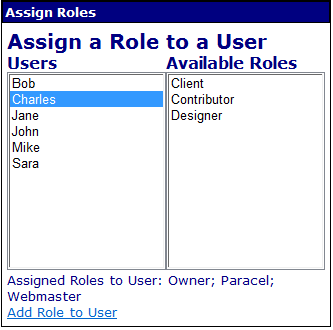
CMS Assign Roles Web Part

CMS Assign Roles Web Part

This Web Part is used to assign CMS Roles to a CMS User.

Access

This Web Part is accessed by the CMS Admin Panel.

Procedures

To assign a Role to a User:
  1. Click the name of the user in the left box.
  2. Unassigned Roles are displayed in the right box.
    • Note: assigned Roles are displayed at the bottom of the Web Part.
  3. Select a Role from the right box
  4. Click 'Add Role to User'.
    • The Role is now assigned to the user.

Edit Properties

Custom Edit properties include: