Web Part: CMS Common Edit Properties

Modified on 2017/05/16 19:27 by Charles — Categorized as: CMS, Web Parts

Table of Contents [Hide/Show]


   CMS Common Edit Properties
         Padding
         Back Color
          Login Type
         Public Viewer
         Read Permissions
         Edit Permissions
         Devices
         Language
      Appearance Properties
      Layout Properties


Figure 1: Common Edit Properties

CMS Common Edit Properties

Each Web Part has CMS Common Edit Properties. This includes:

Padding

Enter a numeric value for padding around the color around the Web Part.

Back Color

Select a color for the padding.

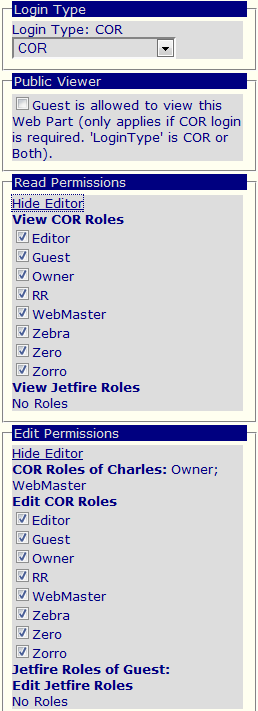
Figure 3: Edit the Login Type Roles

Figure 3: Edit the Login Type Roles

Login Type

Identify how Login users view the Web Part content. This provides a powerful technique for controlling how users see Web Part content. e.g. by setting COR to this property, this limits COR logged in users access to the Web Part.

Public Viewer


Read Permissions


Edit Permissions

If a Login Type is selected, then Roles may be selected to further identify specific user groups that may edit the content. The default is that all Roles are allowed to edit the content.

Devices

Identifies the type of devices that the web part can be displayed on. This includes:

Language

The language of the Web Part. This language is matched against the user's preferred language. 'All languages' is the default. The Web Part is displayed for any user preferred language.

Figure 4: Appearance Properties

Figure 4: Appearance Properties

Appearance Properties

Appearance Properties include:


Figure5: Layout Properties

Figure5: Layout Properties

Layout Properties

Layout Properties include: