Web Part: CMS File Viewer

Modified on 2011/04/21 02:37 by Charles — Categorized as: CMS, CMS Administration, Web Parts

Table of Contents [Hide/Show]


   CMS File Viewer Web Part
      Access
      Features
      Procedure
   Edit Properties


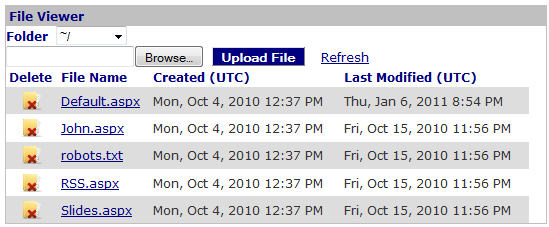
Figure 1: File Viewer

Figure 1: File Viewer

CMS File Viewer Web Part

File Viewer is used to display Files that are in a folder.

Access

This Web Part is accessed by the CMS Admin Panel.

Features

Features for the Manage Files Web Part include:
Figure 2: File Viewer with Upload option

Figure 2: File Viewer with Upload option

Procedure

Select files in a folder:
  1. Select the folder for the files to be viewed.

Files are uploaded to a specific folder as follows:
  1. Browse to the file to be uploaded.
  2. Select the file and click Open.
  3. Click 'Upload' to upload the file.

Open a file:
  1. Click the name of the file to open it.

Delete a file:
  1. Click delete, the 'x', to delete the file.

Figure 2: File Viewer Editor

Figure 2: File Viewer Editor

Edit Properties

Custom Edit properties for Upload Files include: