Web Part: CMS Synchronization

Modified on 2011/04/21 03:18 by Charles — Categorized as: CMS, CMS Administration, Web Parts

Table of Contents [Hide/Show]


   CMS Synchronization Web Part
      Access
      Features
      Procedure
   Edit Properties


Figure 1: Synchronization Web Parts

Figure 1: Synchronization Web Parts

CMS Synchronization Web Part

This Web Part is used by the COR Administrator to synchronize Web Parts to pages within a folder.

Access

This Web Part is accessed by the CMS Admin Panel.

Features

Features for the Manage Files Web Part include:

Procedure

Files are synchronized as follows:
  1. Select the targeted folder with pages that need to be synchronized.
  2. Select the Web Part that is the source on this page.
  3. Check 'Add Web Part' if a web part should be added if not found on the page.
  4. Click "Sync' to update the 'same' Web Part on every page in the targeted folder.

Figure 2: Synchronization Web Parts Editor
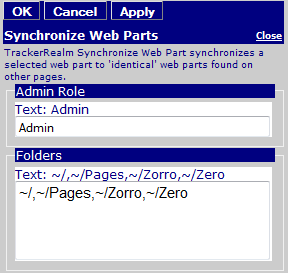
Figure 2: Synchronization Web Parts Editor

Edit Properties

Custom Edit properties include: