Web Part: CMS Upload Files

Modified on 2011/04/21 14:47 by Charles — Categorized as: CMS, CMS Administration, Web Parts

Table of Contents [Hide/Show]


   CMS Upload Files Web Part
      Access
      Features
      Procedure
   Edit Properties


Figure 1: Manage Files

Figure 1: Manage Files

CMS Upload Files Web Part

This Web Part is used by users to upload files for use on the website.

Access

This Web Part is accessed by the CMS Admin Panel.

Features

Features for the Manage Files Web Part include:

Procedure

Files are uploaded to a specific folder as follows:
  1. Browse to the file on your local machine by clicking the 'Browse' button
  2. Click the 'Upload File' button to save the file to the folder

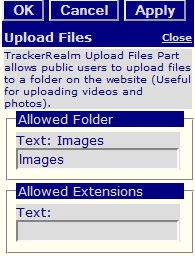
Figure 2: Upload Files Editor

Figure 2: Upload Files Editor

Edit Properties

Custom Edit properties include: