COR Libraries

Modified on 2014/09/30 14:31 by Charles — Categorized as: CMS, Library, Website Design


COR (Content Management) Libraries

Libraries are also referred to as the 'Catalog of Web Parts'.


Figure 1: TrackerRealm Web Parts Catalog
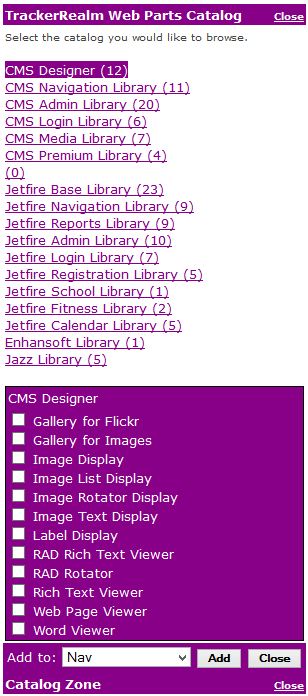
Figure 1: TrackerRealm Web Parts Catalog

Adding Web Parts from the Library

This section is intended for the COR Administrator.

Figure 1 displays the TrackerRealm Web Parts Catalog that contains COR and Jetfire Web Part Libraries.

COR Login Status

The above figure shows the Login Change Control Web Part. When the COR Administrator is logged into the website, the Login Change Control Web Part Part is displayed. This displays
When the COR Administrator is logged into the website, they can easily add Web Parts to a page from the TrackerRealm Library. This is done by entering the 'Library mode'.

Adding Web Parts to ASP.NET pages

This section is intended for the Website Designer.

TrackerRealm Web Parts may be used on sites with or without Personalization. Refer to ASP.NET Personalization to understand additional functionality available when Personalization is used.

The Personalization Control is used to implement Site Personalization.

ASP.NET Personalization

This section is intended for the Website Designer.

TrackerRealm Web Parts are used with ASP.NET 2.0 Personalization. With Personalization, users with login privileges may configure TrackerRealm Web Parts within live web pages. For more information, refer to the Microsoft website. This is similar to SharePoint Personalization. ASP.net Personalization allows a similar user experience to SharePoint, without requiring Windows SharePoint Services software.