Web Part: Jazz Grid

Modified on 2017/05/24 01:41 by Charles — Categorized as: Jazz Web Parts, Web Parts

Table of Contents [Hide/Show]


   Jazz Grid Web Part
      Access
      Edit Properties


Jazz Grid Web Part

This Web Part displays Jazz Models in a table (or grid).
Figure 1: Jazz Grid

Figure 1: Jazz Grid


Access

This Web Part is accessed by the Jazz Base Library.

Edit Properties

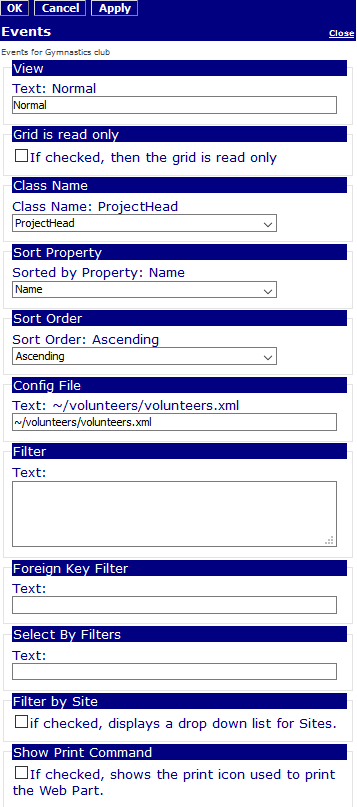
Custom Edit properties include:
  • View: The view is used in combination with the Configuration File to retrieve Workflow properties used to display the Jazz Model.
  • Grid is read-only: If checked, then the grid on the page is read only.
  • Figure 1: Read-only Jazz Grid

    Figure 1: Read-only Jazz Grid

  • Class Name: The class name of Jazz objects that are displayed.
  • Refer to Jazz Sorting for Sort Property, Foreign Key Sort, Sort Order parameters
  • Refer to Jazz Filtering for Config File, Filter, Foreign Key Filter, Select By Filters, Filter by Site parameters
  • Show Print Command: If checked, then a print icon is displayed with the Web Part making it simple to print.
  • Jazz Common Edit Properties
Figure 2: Editor for Jazz Grid

Figure 2: Editor for Jazz Grid