Custom Edit properties include:
- Class Name: The class name of Jazz objects that are displayed.
- Refer to Jazz Sorting for Sort Property, Foreign Key Sort, Sort Order parameters
- Refer to Jazz Filtering for Config File, Filter by Site, Filter, Foreign Key Filter parameters
- Layout:
- Row: Properties are displayed in a row.
- Column: Properties are displayed in columns.
- Tile: Properties have a custom display.
- Cell Format: Same as row.
- PageSize: The number of objects displayed in the table per page. If the number of objects displayed is less than the total number of objects to display, then a pager is shown to advance the objects displayed.
- HeaderCssClass: The CSS style used for the head row of the table.
- TextCssClass: The CSS style used for the text of rows in the table.
- TextCssClassAlt: The CSS style used for text of alternate rows in the table.
- Skin: Select how the pager will be styled.
- Jazz Common Edit Properties
|
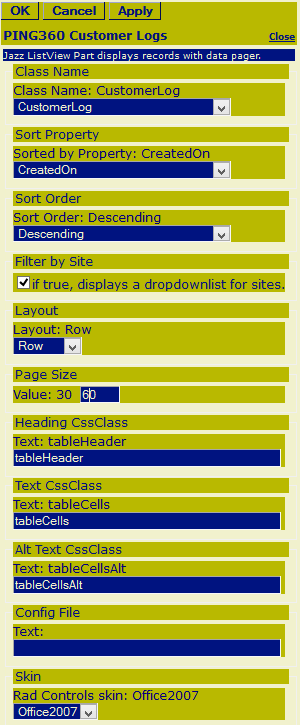 Figure 3a: Editor for Jazz ListView |