The Jazz Model Access Control List Web Part is used to assign an ACL to any Jazz Record Access Control List (ACL).
ACLs are explained at Jazz ACLs,
Figure 1 explained
Figure 1 shows the Web Part with the User 'dave' selected in the User box (left side). Looking at the right side of the Web Part,
- The Workspace is Public.
- The assigned Roles are: Coordinator with the Denied Access Type.
- The Unassigned Roles are Admin.
Procedures
- To change the Workspace, select the new Workspace in the Workspaces box and click the Change button. The display is updated to show the change.
- To Remove an Assigned Role, select a Role to be removed from the Assigned Roles box and click the Remove button. The display is updated to show the change.
- To Add an unassigned Role, select a Role to be added from the Unassigned Roles box, select the Access Type: Allow, Denied or Read-Only, and click the Add button. The display is updated to show the change.
- The Web Part can be configured to show the Jazz Object for a number of different Class Names.
|
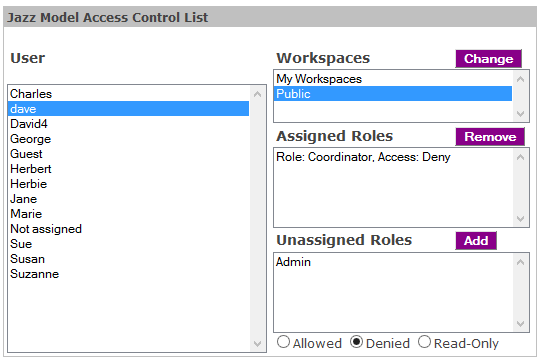 Figure 1: Jazz Model Access Control List |