Web Part: Jazz Report Builder

Modified on 2014/09/26 22:34 by Charles — Categorized as: Jazz Web Parts

Table of Contents [Hide/Show]


Jazz Report Builder Web Part

This Web Part is a general purpose part to display Reports.
Figure 1 shows the report when first presented on the page.
Figure 2 shows the report after the user selected a report to display.

Features

  • Report Builder uses Workflow Configuration File for Web Design. In particular, the section on Report Filters describes how xml is used to create Jazz filters for Reporting.
  • Reports can be exported in different formats:
    • Excel xls format as an exported file
    • Excel csv (comma-delimited) format as an exported file
    • Html format displayed in the page
  • The number of records displayed is shown.
  • Use Configuration Parameters to display what fields are displayed.
  • Use Filtering to select records to be displayed.
  • Use sorting to select how records are displayed.
Figure 1: Jazz Report Builder

Figure 1: Jazz Report Builder


Figure 2: Jazz Report Builder

Figure 2: Jazz Report Builder


Access

This Web Part is accessed by the Jazz Admin Library.

Edit Properties

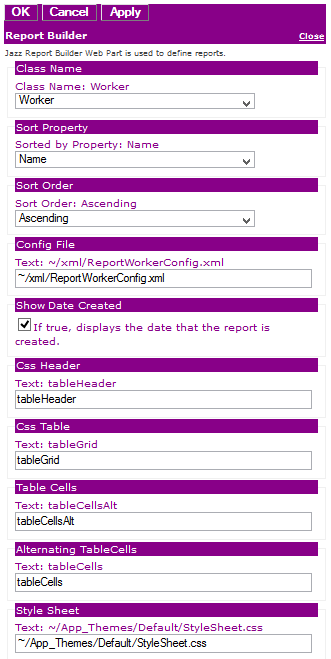
Custom Edit properties include:
  • Admin Role: A semi-colon delimited list of Roles allowed to access this Web Part. If blank, then anyone can view this Web Part.
  • Class Name: The class name of Jazz objects that are displayed.
  • Refer to Jazz Sorting for Sort Property, Foreign Key Sort, Sort Order parameters
  • Refer to Jazz Filtering for Config File, Filter by Site, Filter, Foreign Key Filter parameters
  • Show Date Created?: if checked, displays the date that the report is created.
  • CSS Header: The CSS style used on the table header (html view only)
  • CSS Table: The CSS style used on the table (html view only)
  • Table Cells: The CSS style used for displaying Rows (html view only)
  • Alternating Table Cells: The CSS style used for displaying alternate Rows (html view only)
  • Style Sheet: The path to the style sheet used to style the html view of the report.
  • Jazz Common Edit Properties
Figure 3: Editor for Jazz Report Builder

Figure 3: Editor for Jazz Report Builder