Jazz Rules

Modified on 2017/05/18 17:52 by Charles — Categorized as: Jazz, Solutions, Workflow Administration

Table of Contents [Hide/Show]


   Overview
      What is a Rule?
   Jazz Rules
      Conditions


Overview

Before we start looking at Jazz Rules, let's identify what a Rule is in general terms.

What is a Rule?

Definition: Rules describe the definitions, constraints, and operations that apply to an object. Consider the rule as a closed-ended question, i.e. the answer is yes or no. e.g. if the Time of Day is currently between 1 pm and 3 pm, or if the state of the object is currently 'Not started'. If the question is 'yes', then a set of operations or actions can be applied to the object. e.g. A use case for a meeting may be: if today is one day before the meeting, send an email to the meeting participants reminding them of the meeting. The constraint is 'if today is one day before the meeting' and the action is 'send an email to the meeting participants reminding them of the meeting'. What are the steps involved in 'executing' a rule?

1. Determine if the rule applies to the object. - Does this rule apply to this type of object. This is done by comparing the rule's definition to the type of object.

2. If the rule applies to the object, execute the constraints to determine the course of action. - This is done by reviewing the rule's constraints against the object.

3. Follow the course(s) of action. - this may consist of one or more steps, e.g. email or text me, set a specific property in the object to a result.

Implementation:
Example:

Jazz Rules

Figure 3: Rule Conditions

Figure 1: Rule Conditions

Figure 2: Rule Actions

Figure 2: Rule Actions


Conditions

Figure 3: If Day of Week Condition

Figure 3: If Day of Week Condition

Figure 4: If then else Condition
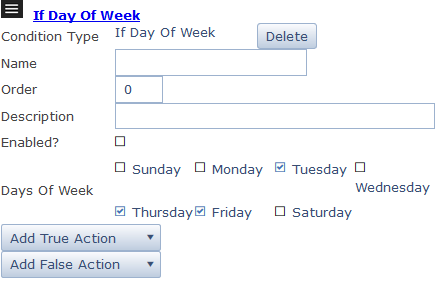
Figure 4: If then else Condition