Web Part: Jazz Search

Modified on 2014/09/25 14:33 by Charles — Categorized as: Uncategorized

Table of Contents [Hide/Show]


   Jazz Search Web Part
      Access
      Edit Properties


Jazz Search Web Part

Figure 1 shows a the basic search form. Enter the text that you are searching and click the Search button.
Figure 2 shows a completed search.

Search Notes

  • If the search string contains spaces, each separated string is treated as separate text to search for.
  • The search message in the edit properties is displayed as a prompt to the user
  • Check the case sensitive check box for case sensitive searches.
  • Search results highlight the matched text./
  • Search tries to find the match text in the displayed properties of the defined Class Name.
  • The number of records found is displayed.
  • Displayed results are shown in a list
    • The first node is a hyperlink that when clicked will display the Jazz object (if a Jazz Editor or Jazz Viewer is configured on the page).
    • A list of properties is displayed, based on the Search Properties (see below).
    • If the Search Properties are blank, then the Configuration Parameters are used.

Figure 1: Jazz Search

Figure 1: Jazz Search

Figure 2: Jazz Search

Figure 2: Jazz Search

Jazz Counts Web Part creates a report for the counts of common records.

Access

This Web Part is accessed by the Jazz Admin Library.

Edit Properties

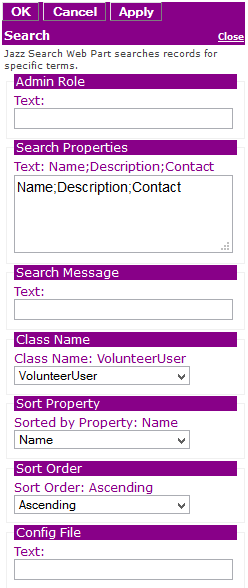
Custom Edit properties include:
  • Admin Role: A semi-colon delimited list of Roles allowed to access this Web Part. If blank, then anyone can view this Web Part.
  • Search Properties: A semi-comma delimited list of properties being searched. If blank, then all properties are searched.
  • Search Message: A message displayed in the browser, indicating what tables are being searched.
  • Class Name: The class name of Jazz objects that are displayed.
  • Refer to Jazz Sorting for Sort Property, Foreign Key Sort, Sort Order parameters
  • Refer to Jazz Filtering for Config File parameters
  • Jazz Common Edit Properties
Figure 3: Editor for Jazz Search

Figure 3: Editor for Jazz Search