Custom Edit properties include:
- Title Class: The CSS style used for the title of the Web Part.
- Label Class: The CSS style used for the labels in the Web Part.
- Form Layout: The format for how the data is displayed.
- Row: Display properties as a label and the value in the same row.
- Column: Display properties as a label and the value in the same column.
- Tile: Display properties as a label in the first row and the value indented in the next row.
- Cell Format: Display multiple properties in the same cell of a row.
- Config File: an xml-based file that contain workflow configuration parameters used to customize the display of a Jazz object.
- Show Print Command?: if checked, displays an icon that if clicked prints just the editor.
- Jazz Common Edit Properties
|
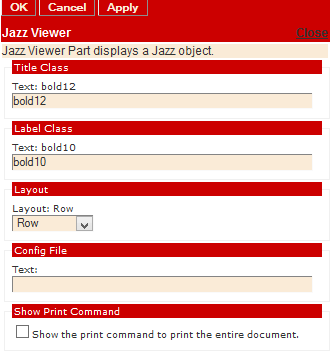 Figure 3a: Editor for Jazz Viewer |