Web Part: CMS Link Lists

Modified on 2011/04/26 15:07 by Charles — Categorized as: CMS, Web Parts

Table of Contents [Hide/Show]


CMS Link Lists Web Part

The CMS Link Lists Web Part is used to add navigation to the website. This section shows examples of how the Link List is displayed in a browser. Figures 1, 2, 3 and 4 are examples of how the Link List may be configured. Figure 1: Link List Example (Tab appearance)

Figure 1 displays the Link List as a Tab. Colours and style are used from the stylesheet.

Figure 2: Link List Example (Vertical Buttons)

Figure 2 displays the Link List as a vertical set of buttons. Colours and style are used from the stylesheet.

Figure 3: Link List Example (Horizontal Strip)

Figure 3 displays the Link List as a horizontal strip. Colours and style are used from the stylesheet.

Figure 4: Link List Example (Horizontal Links)

Figure 4 displays the Link List as set of horizontal links. Colours and style are used from the stylesheet.

Access

The Web Part is accessed from the CMS Navigation Web Parts Library.

Link List Features


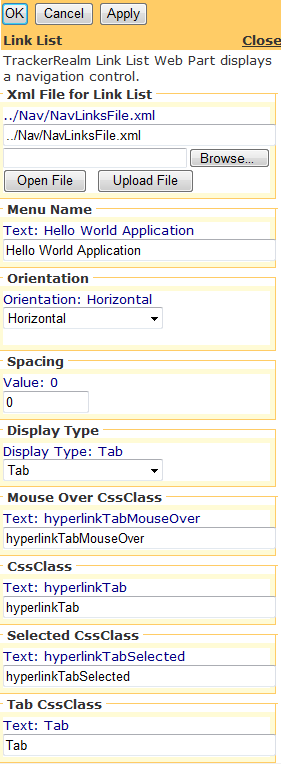
Figure 5: Link List Editor

Figure 5: Link List Editor

Edit using Link List Editor

Figure 5 shows link list attributes being edited.

Edit Properties

Custom Edit properties include: