Web Part: Review Jazz Users Roles

Modified on 2014/09/29 14:06 by Charles — Categorized as: Jazz Web Parts

Table of Contents [Hide/Show]


Review Jazz Users Roles Web Part

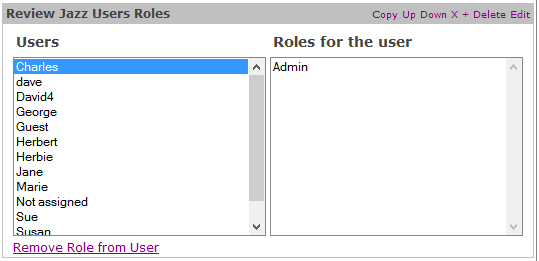
The Review Jazz Users Roles Web Part is used to remove a Role from a User.

Figure 1 explained

Figure 1 shows the Web Part with the User 'Charles' selected in the Users box (left side). Looking at the right side of the Web Part, the 'Admin' Role is assigned.

Procedures

  • To Remove an Assigned Role, select the User in the Users box and a Role to be removed from the 'Roles for the user' box and click the Remove Role from User link. The display is updated to show the change.
  • The Web Part can be configured to show the Jazz Object for a number of different User Class Names.
Figure 1: Review Jazz Users Roles

Figure 1: Review Jazz Users Roles


Access

This Web Part is accessed in the Jazz Admin Panel.

Edit Properties

Custom Edit properties include:
  • Admin Role: A semi-colon delimited list of Roles that can access the Web Part. If blank, then any user can access this Web Part.
  • Class Name: The class name for only Jazz Users that are displayed.
Figure 2: Editor for Review Jazz Users Roles

Figure 2: Editor for Review Jazz Users Roles